
XCOM Chimera Squad Trainer FLiNG
12 Options 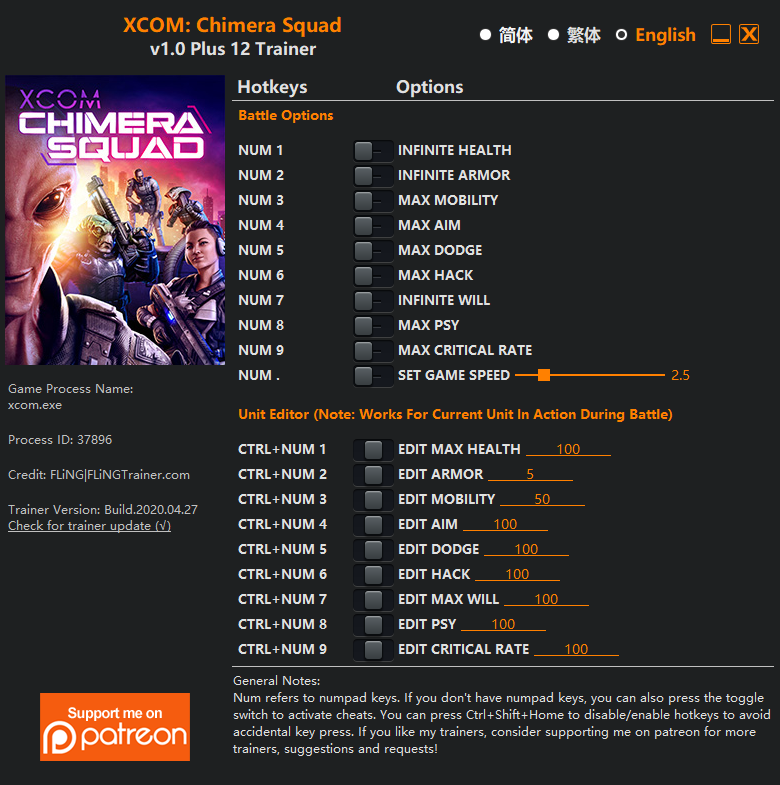
Options
Battle Options
Num 1 – Infinite Health
Num 2 – Infinite Armor
Num 3 – Max Mobility
Num 4 – Max Aim
Num 5 – Max Dodge
Num 6 – Max Hack
Num 7 – Infinite Will
Num 8 – Max Psy
Num 9 – Max Critical Rate
Num . – Set Game Speed
Unit Editor
Ctrl+Num 1 – Edit Max Health
Ctrl+Num 2 – Edit Armor
Ctrl+Num 3 – Edit Mobility
Ctrl+Num 4 – Edit Aim
Ctrl+Num 5 – Edit Dodge
Ctrl+Num 6 – Edit Hack
Ctrl+Num 7 – Edit Max Will
Ctrl+Num 8 – Edit Psy
Ctrl+Num 9 – Edit Critical Rate
NotesUnit Editor options work for the current unit in action during battle. These options will permanently change unit’s stats.
Battle Options may also change unit’s stats. If you want to restore certain stats, you can use Unit Editor options to do so.
Console Commands
This game supports console commands similar to XCOM 2. To enable console, please follow these steps.Set the game language to English (other languages may not be able to input console commands)
Start the game with command line -allowconsole. You can do this by making a shortcut of xcom.exe and add the command line after the target field. xcom.exe is located in you game’s directory\Binaries\Win64\.
When you’re in game, press ` to bring up the console.
Some useful console commands:
Add 1000 money (you can set any values)
GiveResource credits 1000
Add 1000 elerium (you can set any values)
GiveResource elerium 1000
Add 1000 intel (you can set any values)
GiveResource intel 1000
Add all resources by xxx quantity (set any values)
giveMeTonsOfResources xxx
Get all items by xxx quantity (set any values)
giveAllItems xxx
Unlock all research
unlockAllResearch 1
All units level up to max
PromoteAllMax
Ghost mode (In battle)
ghost
Gode mode(In battle)
god
Enemies can’t do action (In battle)
skipai
Kill all enemies (In battle)
killallais
Hello, gamer!! here you can find a trainer for XCOM Chimera Squad!
there are no viruses in the trainers. The most common reasons why the trainer does not work: 1) the trainer version does not match the game version. 2) the game version has been updated. 3) you downloaded the trainer for the wrong part of the game. please note that the trainer changes the values in the computer's RAM. this action may be regarded by the antivirus as suspicious and prohibit the operation of the trainer. I also want to remind you that you will need a 7z/RAR archiver to open the trainers.
you can leave your comment or your thoughts about the coach's work, or your impressions of the game! we also have a telegram chat for live communication with the site administrator, and if you have any questions, you can contact Telegram chat directly! here is the link: https://t.me/Cheats_and_Trainers_review
Guide to the use of trainer
Hello, visitors https://trainersreview.blogspot.com /, we have a video as well as instructions for all players on how to use the trainers. To begin with, let's figure out what trainers are and how they differ, for example, from cheat codes. Cheats or cheat codes are secret commands pre-created by game developers, by entering which in the game you can get money, ammunition or activate God mode. But trainers are mini-programs in which enthusiastic programmers have prescribed functions similar to cheats that still add gold or receive endless ammunition, and, for example, you can teleport from one place to another.
And now we'll figure out how to use the trainers. First you need to decide which version of the game you have installed, without this, if you download a trainer for another version, it simply will not be able to activate the necessary cheat functions. There are several ways to find out which version of the game you have installed.
The first way is to go to the control panel, then find the game in the "Programs and Functions" section, and the current version of the game will be indicated in the "Version" column.
The second way is to go to the folder where the game is installed and find the executable file of the game with the extension ".exe", right-click on it and select properties, then go to the "Details" tab and see the version of the game there.
So, we have decided on the version of the game, now we find the trainer of the desired version on the website https://trainersreview.blogspot.com / and download it. I also want to draw your attention to the fact that trainers are created by many authors, among them such as FLiNG, MrAntiFun, LinGon, and if a trainer from one author is not suitable for your game, download a trainer from another author.
Next, we will analyze how to download simulators from our website https://trainersreview.blogspot.com /, it's very easy to click on the download link and go to the trainer download page.
and so download the cheat trainer from the file sharing service.
Please note that all trainers are automatically checked for viruses due to the fact that they are stored in an online file sharing service, and you will not be able to download the file if it is infected or is a virus in itself.
Now, having decided on the version of the trainer and downloaded it from the site, we need to figure out how to run the trainers. It's very simple, for this you need to follow a few simple steps:
Unpack the archive with the trainer in a convenient place for you.
Start the trainer, then start the game.
During the game, we press the necessary keys to activate the effect you need: immortality, an infinite amount of gold or gaining experience. For example, let's take a trainer for the game Warhammer: Chaosbane from the author {FLiNG}

At the top of the trailer, we can see which version of the game it was created for, and the number of supported options. In our example, this is version v1.0 and 14 options.
The right side of the trainer lists all its options and which keys you need to press to activate certain options. For example, to activate infinite gold, you need to press the Numpad 4 key, and to activate super speed Numpad 9. The Numpad keys are part of a keyboard called a numeric keypad, and look something like this:

If you do not get the desired effect by pressing the keys, check your version of the game and the version of the trainer, whether the version of the trainer and the version of the game match, check if the digital block is on, the Num Lock key is responsible for activating it. (you can also use the Num lock keys using the Windows virtual keyboard)
I wish you good luck in passing the games!
like the site ?? add to bookmarks, i will be happy =))
Comments
Post a Comment